For your ChatGPT conversations
Keep what matters.
Make some room.
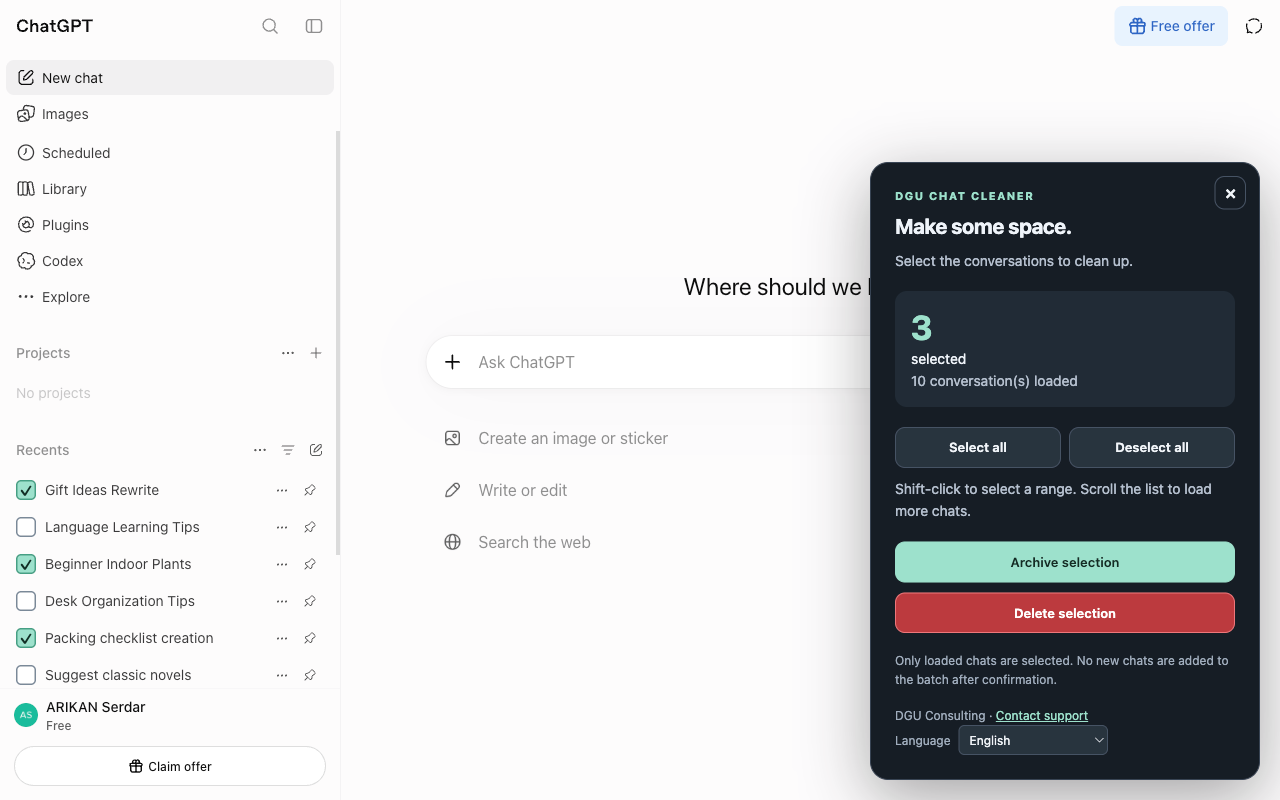
Select multiple conversations, review your list, then delete or archive them in one operation.
Chrome Web Store publication is being prepared.

A few checkboxes.
A clearer history.
Open the panel directly in ChatGPT using the extension icon.
Choose your conversations.
Select one by one, use Shift + click for a range, or select all currently loaded conversations.
Confirm your list.
Choose archive or delete and check the titles before starting the batch.
Follow the progress.
Keep the tab open without interacting with ChatGPT. You can request a stop after the current conversation.
Your selection,
always in view.
A counter, a list to review and a summary when processing ends.
Privacy, simply
Your conversations stay in your session.
The extension uses the titles and identifiers needed for cleanup in your tab. It does not send this information to DGU Consulting or store it in a database.
Actions use the ChatGPT interface. The current version includes no advertising, analytics or payments.
Read the privacy policy →Before you clean up.
Does this select my entire history?
Select all only includes conversations loaded in the sidebar. Scroll the list to load more. The batch is fixed after confirmation.
Can I recover a deleted conversation?
No. Deletion is permanent. If you only want to remove a conversation from the visible history, choose archive.
Do I need to confirm each deletion?
You confirm the batch shown by the extension once. It then processes conversations one at a time and stops if it cannot identify the target with sufficient certainty.
Which browsers and languages are supported?
The extension is designed for desktop Chrome on chatgpt.com. Its interface is available in English and French. Automatic mode follows the browser interface language: French when it is French, English otherwise. You can also select English or French in the panel; this preference is saved on your device. French and English ChatGPT menus are supported; compatibility may change as the website evolves.
Is there a subscription?
The current version has no subscription, payment or quota added by the extension. ChatGPT’s own limits still apply.
Is this an official OpenAI extension?
No. DGU Chat Cleaner is published by DGU Consulting and is not affiliated with OpenAI.